






Display Cold Room Temperature Fluctuation: Causes and Practical Fixes
Start with the fluctuation pattern, not the equipment room
When a Display Cold Room drifts up and down, operators often jump straight to the condensing unit or thermostat. That is not always the best first move. The useful question is simpler: when does the temperature move, how far, and what was happening at that time? A room that spikes after every restocking shift is a different problem from one that slowly warms overnight or swings all day for no obvious reason.
For day-to-day troubleshooting, build your check in that order. Look at the room trend, compare it with door activity, loading time, defrost periods, and compressor run cycles, then start touching the hardware. That sequence usually saves time and prevents unnecessary parts replacement.
Check what is happening at the door
Frequent door opening is still one of the most common reasons for Display Cold Room temperature fluctuation, especially in retail back rooms, prep areas, and fast-pick storage. If warm, humid air keeps entering, the system may recover eventually, but the room will never look stable on the chart.
- Watch whether temperature rises line up with shift changes, stocking windows, or cleaning periods.
- Check door gaskets for gaps, hardening, or torn corners.
- Make sure the door closes fully without being held open by product carts, floor ice, or misaligned hinges.
- If strip curtains or air curtains are used, confirm they are still in place and not damaged.
A simple operator mistake shows up a lot here: leaving the door open during short tasks because “it will only take a minute.” In cold storage, those minutes add up fast.
Look for airflow blockage before blaming cooling capacity
If the room sensor says temperature is unstable but the refrigeration system seems to be running normally, poor air circulation is a likely cause. Product stacked too close to the evaporator, cartons blocking return air, or overfilled shelves can create warm pockets. Then operators see uneven temperatures and assume the room is underpowered.
What to check on the floor:
- Clear space around the air cooler inlet and outlet.
- Keep product off the wall where return air needs to move.
- Do not stack fresh warm goods directly under the discharge air if sensitive items are already stored nearby.
- Listen for fan motors that are running slowly, intermittently, or making abnormal noise.
If one corner stays warm while another is fine, that is usually airflow or loading practice, not a room-wide refrigeration failure.
Do not ignore the product load entering the room
A Display Cold Room can only hold stable temperature if the incoming load matches the design and the operating routine. Warm product arriving in bulk can push the room beyond its short-term pull-down ability. Operators sometimes call this a temperature problem when it is actually a loading problem.
If fluctuations appear right after deliveries, check three things: how warm the product was on entry, how much was loaded at one time, and whether pallets were packed so tightly that cold air could not circulate. Splitting large inbound loads into smaller batches often improves stability faster than changing setpoints.
Compare controller readings with a real measurement
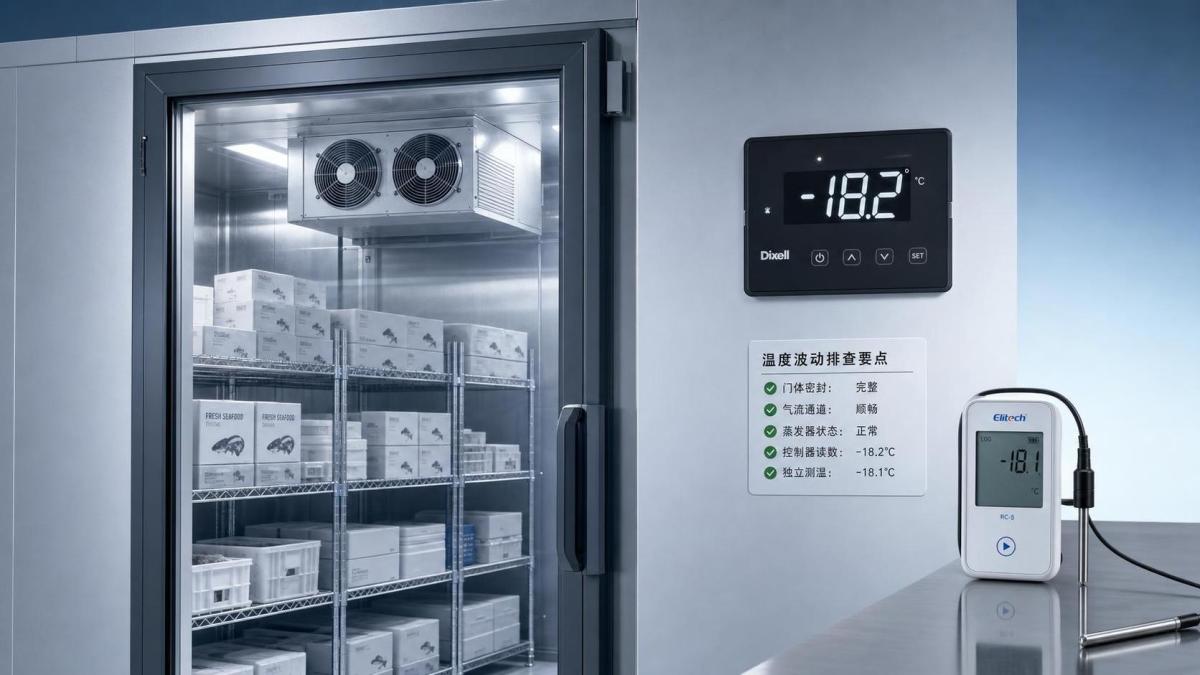
Sensor drift, poor probe placement, or loose wiring can make a normal room look unstable. Before changing any major component, compare the controller display with a trusted calibrated thermometer placed in a representative location, not right in the discharge air and not next to the door.
This step matters because a bad reading leads to bad decisions. Many unnecessary service calls start with trusting the screen without cross-checking the actual room condition.
Review defrost timing and coil condition
Some temperature movement during defrost is normal. Trouble starts when defrost is too frequent, too long, or incomplete. A heavily iced evaporator restricts airflow and cooling. An oversized defrost schedule adds heat to the room more often than necessary.
Operators should check whether fluctuation peaks occur at the same times every day. If they do, pull the controller history and compare those times with the defrost program. Then inspect the coil: light, even frost can be normal; thick ice buildup, especially concentrated in one area, points to airflow restriction, door infiltration, or defrost problems.
Inspect the room envelope if fluctuations never fully settle
When the system runs hard but the Display Cold Room still drifts, heat may be entering through the structure. Panel joints, damaged seals, wet insulation areas, and thermal bridges all make the room harder to control. This is especially worth checking in older installations or rooms that were expanded, repaired, or modified over time.
For projects where panel performance is a deciding factor, operators and buyers usually look at insulation continuity, moisture resistance, and joint quality, not just thickness on paper. In mid-to-high-end cold storage or pharmaceutical and food cold chain use, a panel solution such as PIR Panel is often considered when stable insulation, low water absorption, and reduced cold bridging matter. The useful check is whether the installed wall and ceiling system still matches the operating temperature, humidity exposure, and traffic level of the room.
Make sure the refrigeration equipment matches the actual use
Sometimes the room is not malfunctioning. It is simply being used harder than the original design intended. More frequent access, higher ambient temperature around the room, added lighting, denser storage, or warmer inbound goods all increase the load.
A few field signs suggest mismatch:
- The compressor runs for very long periods with little stable hold time.
- Temperature improves at night but struggles during business hours.
- Fluctuation became worse after the room use changed, even though no component failed.
At that point, raising or lowering the setpoint a little may hide the symptom, but it will not solve the root issue. The real fix may involve airflow changes, operating discipline, or equipment reassessment.
Use a practical troubleshooting order
For operators, the best routine is usually this:
- Match the fluctuation time with door activity, loading, and defrost cycles.
- Check airflow paths and product stacking.
- Verify the displayed temperature against a reliable independent reading.
- Inspect the evaporator, fans, and visible frost condition.
- Examine door seals, panel joints, and any signs of moisture or air leakage.
- Only after that, move deeper into controller settings and refrigeration capacity review.
That order keeps the diagnosis grounded in what usually goes wrong in real operation. Most temperature fluctuation problems in a Display Cold Room come from usage, airflow, sensing, or infiltration before they come from a major mechanical failure. Find the pattern first, then fix the source that matches it.